

 Bahasa Indonesia
 Deutsch
 Español
 Français
 Português (Brasil)
 Türkçe
 ไทย
 中文(简体)
 中文(繁體)
 日本語
 한국어
Rules summary
The game in one minute
Section titled “The game in one minute”Your robot is dropped into an unknown maze, alone. In 8 minutes, with no help from you, it must:
- Explore the maze without getting stuck or falling into holes.
- Find the wall tokens, the victims and cognitive targets on the walls, and report what each one is.
- Map the maze, and send the map at the end.
- Return to where it started.
Everything below explains these four jobs in detail. You do not need to remember it all now: come back to it as you program each part.
Mission and objective
Section titled “Mission and objective”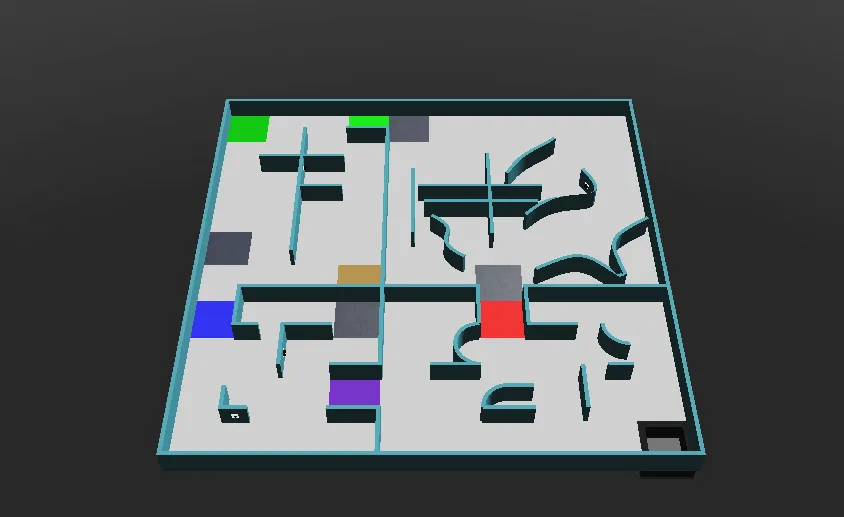
The robot must autonomously explore an unknown environment while keeping itself out of trouble. There are three main missions:
- Navigating a complex maze without getting stuck
- Mapping the environment accurately
- Finding and identifying wall tokens: letter victims and cognitive targets
The field
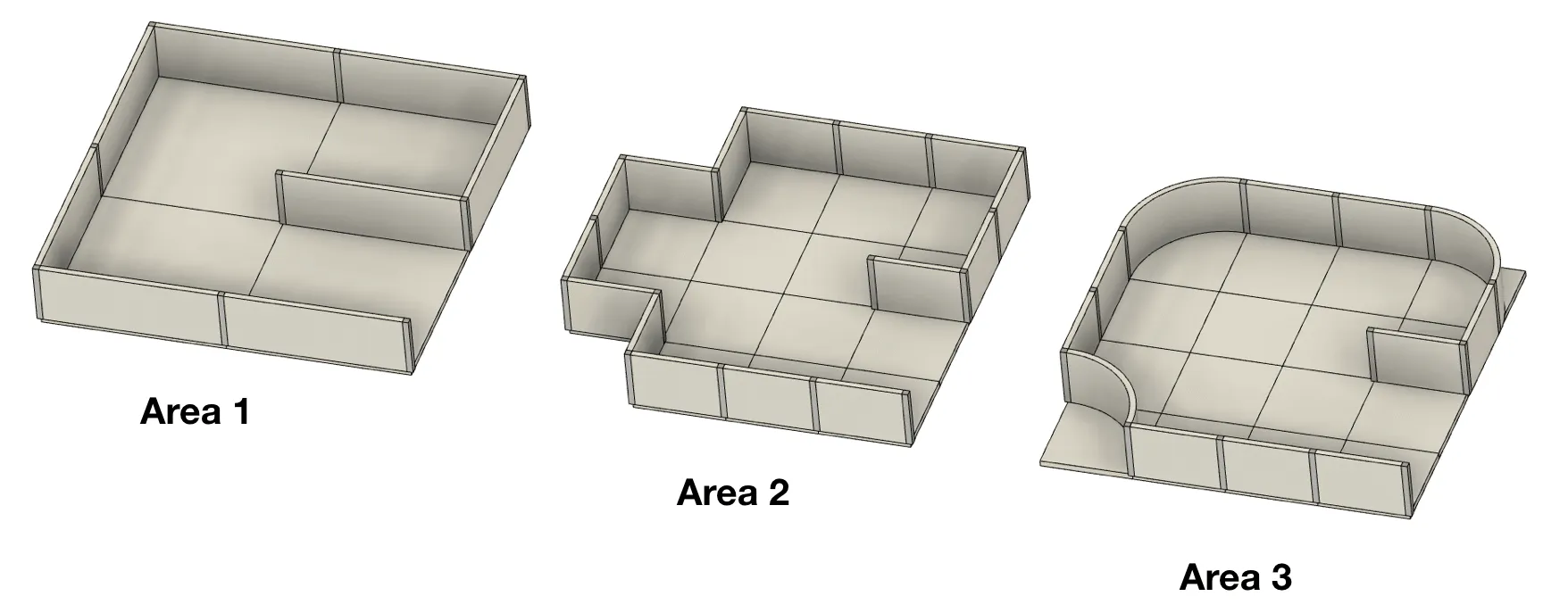
Section titled “The field”The field may be divided into four areas, and each passage between areas is one standard tile wide. Tiles are a concept used to generate the field, not physical structures.
- A tile is 12 cm × 12 cm. In Areas 2 and 3, each tile is subdivided into four quarter tiles of 6 cm × 6 cm.
- Walls are 1 cm thick and 6 cm high.
- Pathways are at least as wide as the robot, and may open into wider foyers.
| Area | Walls | Notes |
|---|---|---|
| Area 1 | Can be placed on the edges of each tile | The starting tile is in this area |
| Area 2 | Can be placed on the edges of each quarter tile | |
| Area 3 | Can be placed on the edges of each quarter tile | 90° corners can be rounded into a quarter circle |
| Area 4 (optional) | Not based on tiles; walls and obstacles are placed arbitrarily | May contain objects such as boxes, and may require diagonal movement |
Passages between areas
Section titled “Passages between areas”Passages are single tiles with walls on two sides, so that they have an unambiguous entrance and exit. Their floor colour tells you which areas they connect:
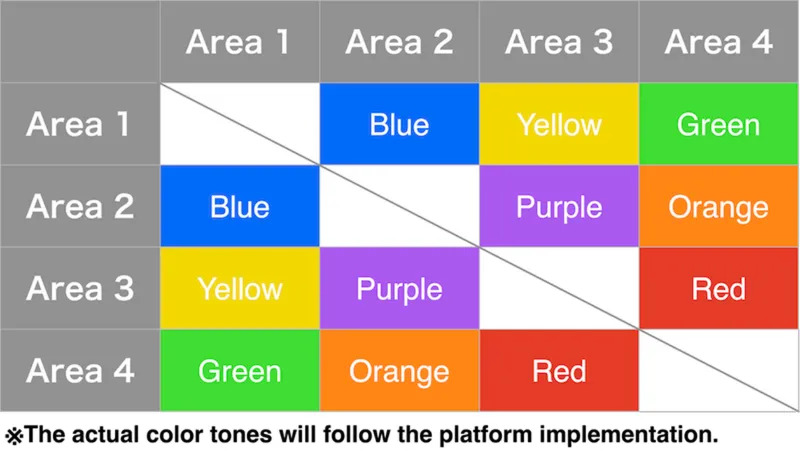
Letter victims are not placed in passages.
Linear and floating tiles
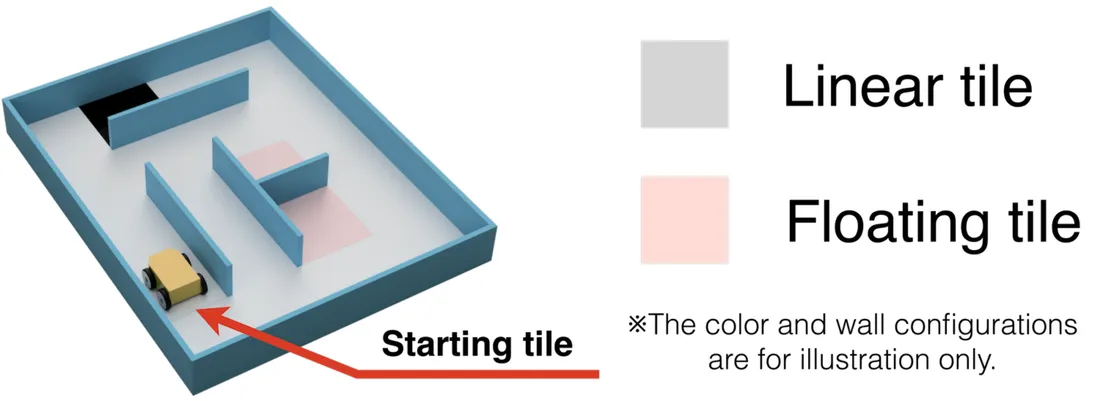
Section titled “Linear and floating tiles”Tiles that lead to the starting tile by consistently following the leftmost or rightmost wall are linear tiles. All the others are floating tiles. Tokens on floating tiles are worth more points. Quarter tiles are not taken into account, and black holes count as virtual walls here.
Checkpoints
Section titled “Checkpoints”Silver tiles are checkpoints, and they can be anywhere on the field. Area 4 contains checkpoints immediately after its passages. After a lack of progress, the robot restarts from the last checkpoint it visited.
Swamps, obstacles and holes
Section titled “Swamps, obstacles and holes”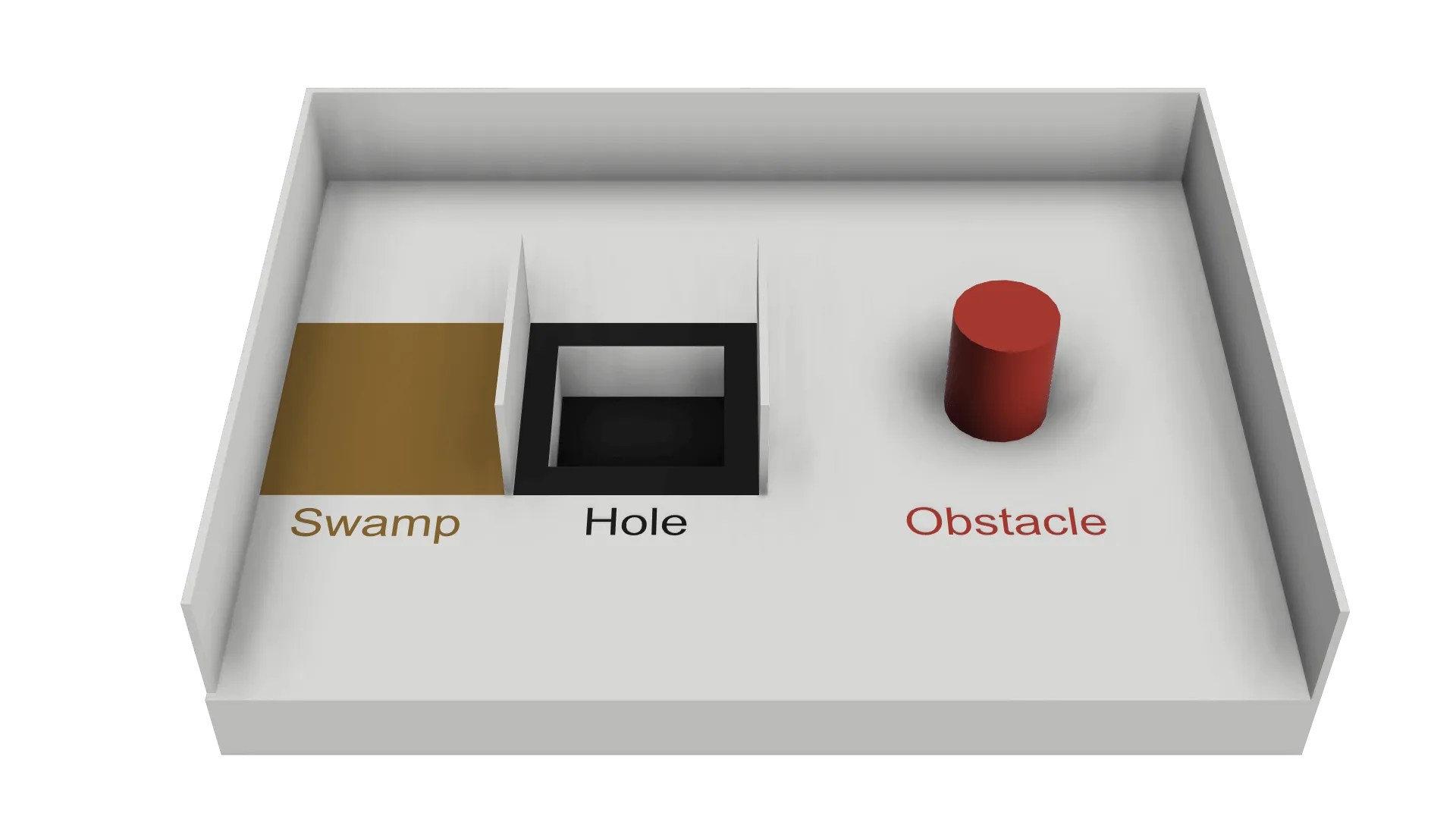
- Swamps (brown tiles) make the game time run faster while the robot is on them. The first time the robot enters a swamp, time runs 5 times faster. Each new entry into the same swamp adds one more, until the limit of x10.
- Obstacles may be fixed to the floor, may have any shape and colour, and affect the width of the pathway. In Areas 1 to 3, the centre of an obstacle is always on a tile, never on the edge between tiles, and there is at most one obstacle per tile.
- Holes have black edges. If the robot falls into one, a lack of progress occurs.
No tile is more than one of the following at the same time: swamp, hole, checkpoint, starting tile, tile with an obstacle, or area passage.
Wall tokens
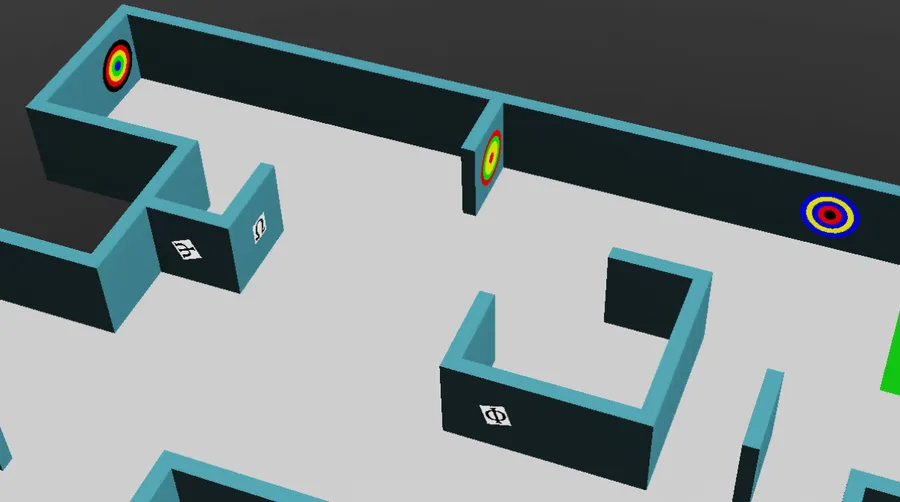
Section titled “Wall tokens”There are two kinds of wall tokens: letter victims and cognitive targets. Both can appear on any wall, including curved surfaces. Letter victims can also be rotated to any angle.
Letter victims
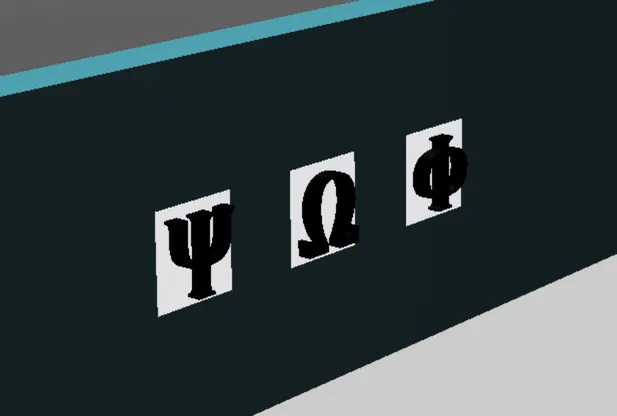
Section titled “Letter victims”Letter victims are 2 cm × 2 cm images. The symbol represents the health status of the victim, and the code is the letter you report and write on the map.
| Status | Symbol | Code |
|---|---|---|
| Harmed | Φ | H |
| Stable | Ψ | S |
| Unharmed | Ω | U |

Fake victims
Section titled “Fake victims”Some wall tokens show the same symbols, but with three-dimensional letters. They are fake: you must not report them to the supervisor or include them on the map. The rules state that this depth can be detected with one of the sensors available in the Robot Customizer.
Cognitive targets
Section titled “Cognitive targets”Cognitive targets represent hazmats. They are circles with a diameter of 5 cm made of five concentric parts, with diameters of 1, 2, 3, 4 and 5 cm. Each colour has a value:
| Black | Red | Yellow | Green | Blue |
|---|---|---|---|---|
| -2 | -1 | 0 | 1 | 2 |
Add up the values of all five parts to get the type. If the sum is not listed below, the target is fake and must not be reported or mapped.
| Sum | Hazmat | Code |
|---|---|---|
| 0 | Flammable Gas | F |
| 1 | Poison | P |
| 2 | Corrosive | C |
| 3 | Organic Peroxide | O |
Adjacent rings of the same colour are not merged: always count all five, even when colours repeat.
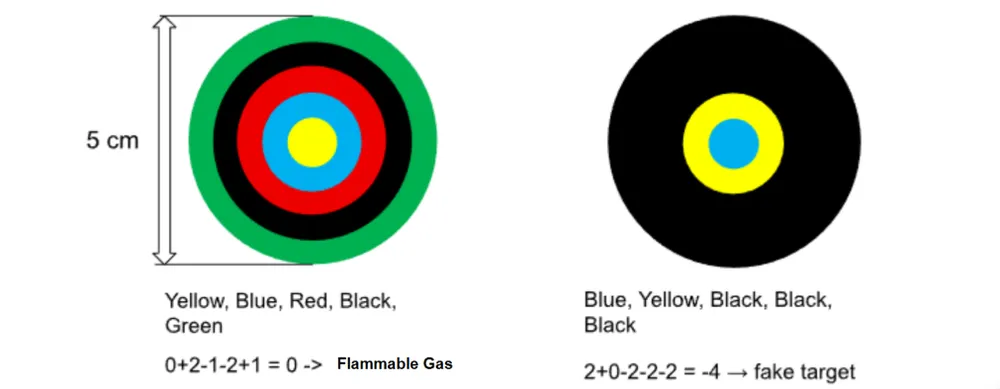
The left target is Yellow, Blue, Red, Black, Green from the centre outwards: 0 + 2 - 1 - 2 + 1 = 0, so it is Flammable Gas (F). The right target is Blue, Yellow, Black, Black, Black: 2 + 0 - 2 - 2 - 2 = -4, so it is fake.
The Wall Tokens tutorial shows how to read a target with a camera.
The robot
Section titled “The robot”- Teams use the robot model provided by the organizers, and may customize it with the Robot Customizer within a budget of 3000. See The Robot.
- The robot can use a GPS, a colour sensor, distance sensors, RGB cameras, a LiDAR, a gyroscope and an accelerometer.
- The simulated sensors have realistic noise. Your program must be robust to it, and organizers will not change the noise levels for the competition.
- Robots must be autonomous. Each team has one robot in the field.
- Pre-mapping is prohibited: this covers both the field and the location of wall tokens, including movements predefined from known positions. It results in immediate disqualification from the round.
Playing a game
Section titled “Playing a game”- A game lasts 8 minutes of simulated time. A second timer runs in real time with a limit of 10 minutes. The game ends when either timer expires.
- A tile counts as visited when the centre of the robot is inside it. Erebus makes this judgment automatically.
- The game also ends when the robot sends the exit command, or when the team captain calls the end of the game (depending on how the game is executed).
- Competition worlds are revealed just before the games, and programs cannot be changed after each round’s deadline.
Lack of progress
Section titled “Lack of progress”A lack of progress (LoP) occurs when:
- The robot has fallen into a hole.
- The robot stays in a fixed location for 20 seconds or more (called automatically).
- The referee determines that the robot is not static, but stuck in a motion sequence.
- The robot calls it autonomously.
- In other cases, the team captain may ask for it, and the referee makes the final decision. This may not apply, depending on how the game is executed.
The robot is then placed back on the last visited checkpoint, or on the starting tile if it never reached one. Its direction cannot be chosen. Erebus also sends the letter L to the robot, so that your program can react to it.
Scoring
Section titled “Scoring”Scoring is automated by Erebus. Rewards are not duplicated: for example, each checkpoint only scores the first time.
To identify a wall token, the robot must stop for at least 1 second, then send the type and position to the game manager. The centre of the robot must be at most half a tile from the token.
| Item | Points |
|---|---|
| Wall token identification (TI) on a linear tile in Areas 1 to 3 | Letter victim: 5, cognitive target: 10 |
| Wall token identification (TI) on a floating tile in Areas 1 to 3, and all tokens in Area 4 | Letter victim: 15, cognitive target: 30 |
| Correct type (TT), in addition to TI | Letter victim: 10, cognitive target: 20 |
| Checkpoint visited (CN) | 10 |
| Wall token misidentification (TMI) | -5 |
| Lack of progress (LoP) | -5 |
The total score cannot go below zero. A misidentification means reporting a position more than half a tile from the token, reporting a token where there is none, or reporting a letter victim as a cognitive target or vice versa. Reporting a fake token falls in the second category.
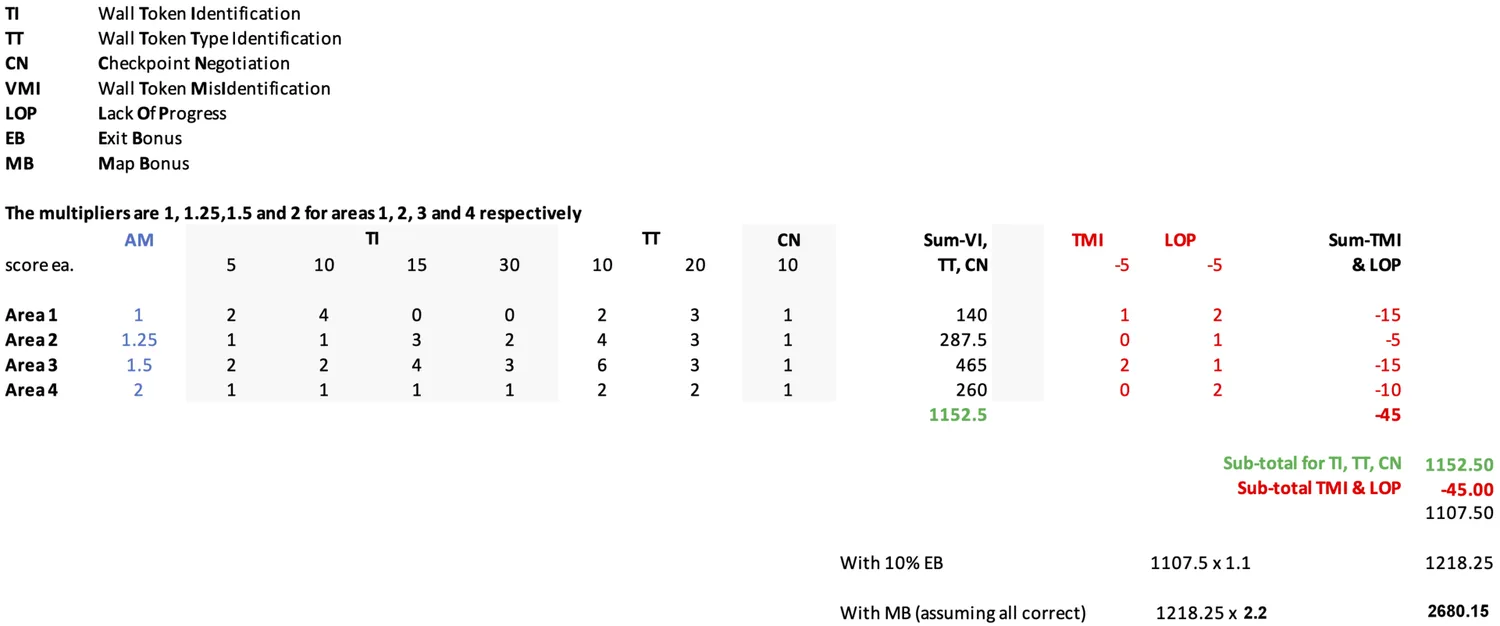
Area multipliers (AM): TI, TT and CN are multiplied by 1, 1.25, 1.5 and 2 in Areas 1, 2, 3 and 4 respectively. TMI and LoP are not multiplied.
Exit bonus (EB): if the robot has identified at least one wall token, returns to the starting tile and sends the exit command, the score is increased by 10%.
Mapping bonus (MB): the robot can submit a map of the maze. The multiplier is correctness × 1.2 + 1, so a perfect map multiplies the score by 2.2. See Mapping.
The field score of a game is calculated as follows:

For example, a run with these results scores 2680.15 points:
The competition
Section titled “The competition”How to prepare, the documents you must submit, the competition setup and the final score are in Preparing for a competition.
Now that you know what your robot has to do, get your robot.

Erebus is part of RoboCupJunior Rescue.
News, events and team documents: RCJ Rescue Community Website
© 2020–2026 Erebus Development Team